Get Ready Now for Fall 2026
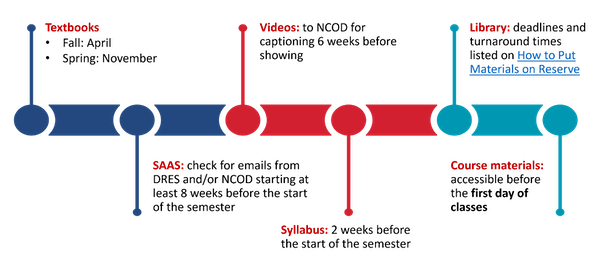
Textbooks: Submit textbook and other instructional materials orders at least 8 weeks before classes start. This helps students by giving them plenty of time to ensure they have access.
- Fall: April
- Spring: November
TidyUP: Before exporting a course, run the TidyUP tool from your Canvas course menu. Identify the files that you will not use in the new semester. Download those files and archive them (on Box, in a sandbox Canvas course, etc.), then remove them from the course you are copying.
Student Access & Accommodations System (SAAS): check for emails from Disability Resources and Educational Services (DRES) and/or NCOD: Deaf and Hard of Hearing Services starting at least 8 weeks before the start of the semester. Visit DRES.
Videos: Review any videos you’ll use for the accuracy of the captions. If any videos are missing captions, or the captions are not accurate, send them to NCOD for professional captions at least 6 weeks before showing. Visit NCOD Media Captioning.
Library: deadlines and turnaround times are listed on How to Put Materials on Reserve
Syllabus: Check your syllabus for accessibility 2 weeks before the start of the semester. Visit how to make an Accessible Syllabus.
Course Accessibility Report: About 2 weeks before classes begin, perhaps on the first official day of the semester, check your Course Accessibility Report for each course you will be teaching. If the overall score is lower than you like, or the Report flags any areas for attention, make a plan to address those.
Course materials: All other course materials need to be accessible before the first day of classes. See the April Academic Technology newsletter (or https://news.csun.edu/category/accessibility/ maybe?) for more articles about how to prepare course materials.
Consultation: If any of the steps above raised questions or you’d like to take a closer look at anything you found, make an appointment with the Universal Design Center team: Make An Appointment via Bookings.