
ChatGPT Edu Study Mode Now Available
Study mode is now available to ChatGPT Edu users. Study mode works with any model available in ChatGPT on iOS, Android, web, and desktop.
What is Study Mode?
Study mode is a new learning experience in ChatGPT designed to help you build a deeper understanding of any topic. When you turn it on, ChatGPT will ask interactive questions to understand your goals and skill level, then work with you to reach the answer together.
With Study mode enabled, ChatGPT can:
- Guide understanding with Socratic-style questions.
- Break concepts into easy to follow sections starting simple and adding complexity as you progress.
- Personalize responses based on your past chats if memory is on, using examples and tips tailored to you.
- Check your understanding with open-ended prompts and feedback.
- Work with your materials by referencing images or PDFs you upload.
How do I enable Study Mode?
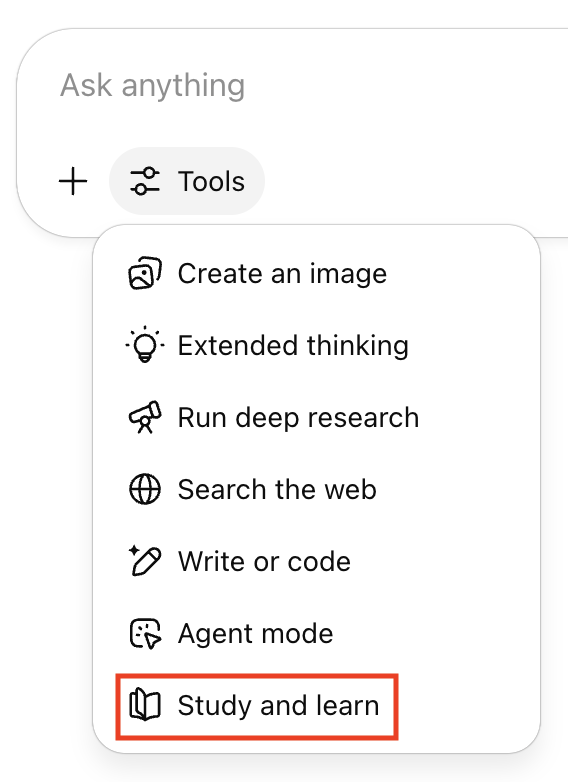
You can enable study mode at any time by selecting Tools in the prompt window and choosing Study and learn from the drop‑down menu or visit chatgpt.com/studymode for detailed instructions.
Study mode is powered by custom system instructions and can have some inconsistent behavior and mistakes across conversations. OpenAI plans on training this behavior directly into the main models once they’ve learned what works best through iteration and user feedback. Visit the OpenAI study mode page.