to
Panopto Clinic

Register for this event Do you have ideas about how you wish you could integrate video into your Canvas page? Join us for this clinic opportunity, bring your questions or… Continue reading Panopto Clinic
|
Monday
|
Tuesday
|
Wednesday
|
Thursday
|
Friday
|
Saturday
|
Sunday
|
|---|---|---|---|---|---|---|
1 event,
to
Panopto Clinic
Register for this event Do you have ideas about how you wish you could integrate video into your Canvas page? Join us for this clinic opportunity, bring your questions or… Continue reading Panopto Clinic |
1 event,
to
Canvas Gradebook Setup
Register for this event Are you ready to eliminate grading confusion and frustration with just a few clicks? Join us for this workshop where we’ll unveil the secrets to a… Continue reading Canvas Gradebook Setup |
1 event,
to
Empower Student Growth with ePortfolios
Register for this event Join us to learn more about ePortfolios and how to incorporate them into your classes. Meet with our ePortfolio Coordinator as they highlight the ways ePortfolios… Continue reading Empower Student Growth with ePortfolios |
1 event,
to
Teaching with Zoom
Register for this event Looking for a refresher on Best Practices when incorporating Zoom into your teaching? This is the workshop for you. Review functionalities like: Breakout rooms and strategies … Continue reading Teaching with Zoom |
2 events,
to
AI Syllabus Statements
Register for this event This workshop focuses on providing resources to craft an AI statement for your course syllabi, which will help outline your policies on the use of artificial… Continue reading AI Syllabus Statements
Free
to
MATLAB Grader in Canvas
Register for this event Starting this Spring, MATLAB Grader is integrated into Canvas, providing a seamless environment for creating and sharing MATLAB coding problems and assessments. This powerful tool allows… Continue reading MATLAB Grader in Canvas |
0 events,
|
0 events,
|
|
0 events,
|
1 event,
to
Poll Everywhere
Register for this event Poll Everywhere is a dynamic online polling platform and web-based student response system that allows participants to vote, respond, and provide feedback on teacher-generated prompts. Poll Everywhere is a tool designed to engage your students with various polling activities such as word cloud, questions, and Q&A. Students can respond on their… Continue reading Poll Everywhere
Free
|
2 events,
to
InnovATe with Media Services + Q&A
Register for this event Get oriented and introduced to the people behind Academic Tech’s Media Services team! Including: Lecture Capture, helping instructors outline, design, record, and produce instructional videos through Panopto and Camtasia. Media Technology, helping instructors utilize and design curricular media through software applications such as the ones found in the Adobe Creative Suite. … Continue reading InnovATe with Media Services + Q&A
to
Information Session for 2025 HEERF Software Tools Transition
Register for this event Join us for an information session on the upcoming transitions for HEERF-funded software tools, including Canvas Studio, Pronto, Hypothesis, and H5P. This session will provide an overview of the impacted tools and available resources to support faculty and staff through the transition. For more information on the HEERF transition, visit 2025… Continue reading Information Session for 2025 HEERF Software Tools Transition |
1 event,
to
AI Tools for Faculty
Register for this event In this workshop, we will explore the exciting potential of integrating AI into education. Through a comprehensive overview and hands-on demonstrations of AI tools like ChatGPT, Microsoft Copilot, Image generating, and a slide generator, Gamma. You will discover how AI can elevate your teaching strategies with prompt engineering tips, assignment design,… Continue reading AI Tools for Faculty |
1 event,
to
Talking with Students about AI
Register for this event This train-the-teacher-to-train-the-student workshop helps faculty give students an overview of AI. It covers the background of AI and the integrity of prompting, assignment use, ethics, and caution about when students should consider using AI. Faculty will have access to the slides to use in their classrooms. Your Zoom link will be in the Additional… Continue reading Talking with Students about AI |
0 events,
|
0 events,
|
2 events,
to
Displaying Letter Grades in Canvas
Register for this event Did you know Canvas can automatically display letter grades? Minimize confusion with the grades in your course by having your points or percentages automatically displayed as Letter Grades. This workshop will show you how to use this time saving function in your courses. Your Zoom link will be in the Additional Information section of the confirmation… Continue reading Displaying Letter Grades in Canvas
to
Advanced AI Tools for Research
Register for this event Discover how to leverage AI to streamline your research process and enhance your scholarly work, incorporating the latest AI tools. Through practical demonstrations and hands-on exercises, you'll learn to use AI tools for literature reviews, data analysis, and writing development, with a focus on your specific research needs. Presented by Dr.… Continue reading Advanced AI Tools for Research |
1 event,
to
Gen AI with Adobe Express
Register for this event Anyone can explore the generative powers of AI to create eye-catching images. Adobe Express has integrated AI generation in an easy-to-use web application. This workshop covers: Creating course images Pertinent presentations Engaging imagery using Adobe Express Your Zoom link will be in the Additional Information section of the confirmation email you receive from Eventbrite when you register, and in… Continue reading Gen AI with Adobe Express |
0 events,
|
1 event,
to
Zoom Beyond the Basics
Register for this event Get engaged with Zoom! Learn how to effectively communicate and collaborate in your synchronous online lectures through the various tools offered. Hold a topical survey or voting session with Polls. Present and collaborate with the digital Whiteboard. Encourage and engage with communicating through Reactions. And more! Your Zoom link will be in the Additional… Continue reading Zoom Beyond the Basics |
0 events,
|
0 events,
|
0 events,
|
|
0 events,
|
3 events,
to
Canvas Insights
Register for this event This hands-on workshop shows faculty how to use CSUN’s Canvas Insights for early alerts. Canvas Insights lets faculty provide support to students who need assistance and positive feedback to students who are doing well. Your Zoom link will be in the Additional Information section of the confirmation email you receive from Eventbrite when you register, and in the confirmation… Continue reading Canvas Insights
to
Engage Student Learning: Video Quizzes in Panopto
Hosted by Mitchell Nagy This workshop introduces faculty to Panopto's Video Quiz function, which allows instructors to embed quiz questions directly into lecture videos. Participants will learn: how to insert quiz questions into Panopto videos, The types of questions available for student engagement, How Panopto integrates with Canvas to create automatically graded video quiz assignments. The workshop… Continue reading Engage Student Learning: Video Quizzes in Panopto
to
AI Prompt Engineering Essentials
Register for this event This hands-on workshop focuses on Prompt Engineering for Generative AI, equipping participants with the essential skills to craft effective prompts from AI models like ChatGPT. Attendees will learn the significance of prompt engineering in enhancing AI interactions and explore the CARE system (Context, Action, Results, Example) as a framework for creating… Continue reading AI Prompt Engineering Essentials
Free
|
2 events,
to
Introduction to Accessibility and Universal Design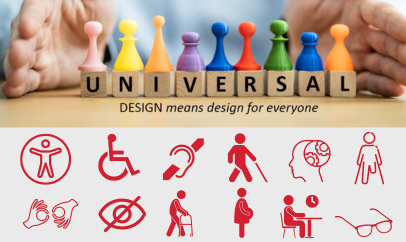
Description: In this introductory session you will learn about the accessibility and universal design strategies and principles necessary to create inclusive learning environments that support all students, faculty and staff alike. Recommended Attendees: Staff, Faculty, Executives, Financial Personnel, Marketing Specialist, Business Analyst, Admin Support, Graphic Designers, and Instructional Support. Learning Objectives: Learn the difference between accessibility and… Continue reading Introduction to Accessibility and Universal Design
to
5 Ways to Integrate AI into Your Assignments
Register for this event Join us to explore five approaches for integrating generative AI into your assignments. We will discuss a range of strategies that help promote AI literacy and fluency among students while supporting their overall learning experience. Whether you're looking to allow AI as an optional resource or embed it more deeply into… Continue reading 5 Ways to Integrate AI into Your Assignments |
1 event,
to
ePortfolio Clinic
Register for this event Join us for an interactive session on using ePortfolios in your courses. This clinic will focus on hands-on demos, exploring best practices, and learning how to create ePortfolios on different platforms. Your Zoom link will be in the Additional Information section of the confirmation email you receive from Eventbrite when you register, and in the confirmation email from Eventbrite you will… Continue reading ePortfolio Clinic |
0 events,
|
0 events,
|
0 events,
|
|
0 events,
|
2 events,
to
Advanced AI Tools for Teaching
Register for this event In this workshop, we'll explore ways to integrate AI chatbots, personalized content generators, and custom GPTs into your teaching, featuring the latest AI tools. Through hands-on practice with ChatGPT, Claude, and course content generators, you'll learn to create your own specialized AI teaching assistants and engaging learning materials that enhance student… Continue reading Advanced AI Tools for Teaching
to
Canvas Quizzes
Register for this event This workshop provides an overview of building and using quizzes in your Canvas course. Topics will include: Creating questions and question banks Assigning points Gradebook Your Zoom link will be in the Additional Information section of the confirmation email you receive from Eventbrite when you register, and in the confirmation email from Eventbrite you will receive one hour prior to the… Continue reading Canvas Quizzes |
1 event,
to
Email Accessibility
Description: This session is the best practices for making email content that is accessible, usable and readable so that the email can reach the greatest amount of readers. Participants will learn why accessibility needs to be considered when creating emails step-by-step to ensure they are accessible. Recommended Attendees: Staff, Faculty, Executives, Financial Personnel, Marketing Specialist, Business Analyst, Admin Support,… Continue reading Email Accessibility |
0 events,
|
0 events,
|
0 events,
|
0 events,
|