New Course Accessibility Report
The Course Accessibility Report within your Canvas courses is now powered by Cidi Labs’ “Universal Design Online content Inspection Tool” (UDOIT). Cidi Labs offers the same features as the previous tool, including alternate file formats, while adding new options to help you with the accessibility of your materials. While the familiar features are present, the interface is different. For example, the colored dials have gone away, and the tool is now accessed through the report in the course menu.

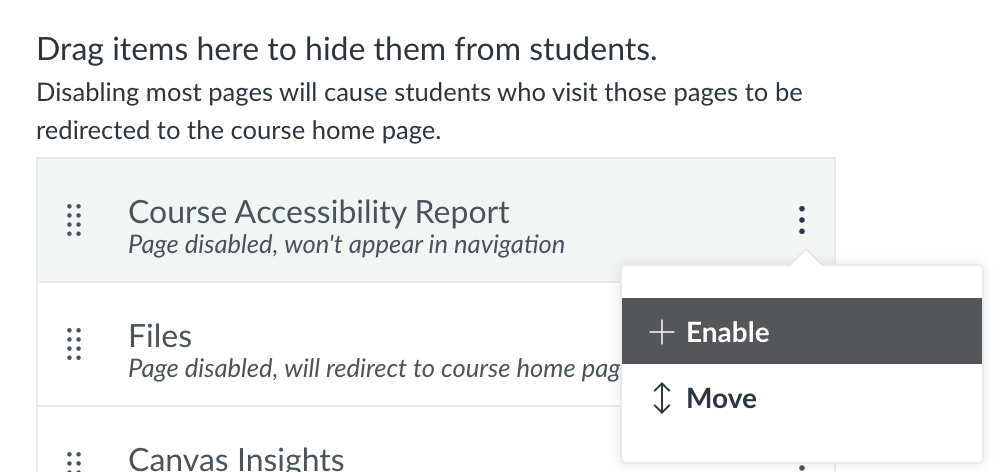
This new Course Accessibility Report will be available in all Canvas courses beginning Fall 2025. If you are teaching during Summer 2025, you may opt in to the new report by going to your course Settings, Navigation tab, find the Course Accessibility Report, and select Enable.
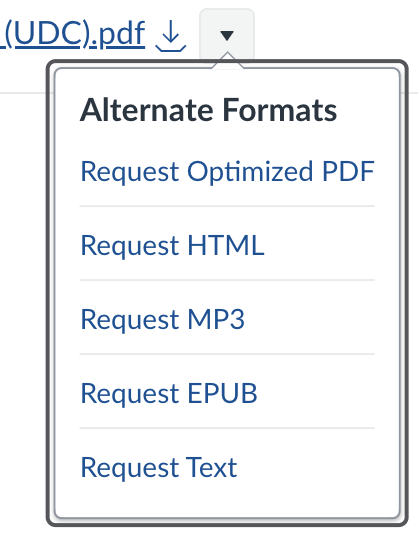
As with the previous tool, students only see the alternate file formats and none of the accessibility information. The menu for students is a little bit different, as shown below.
One of our favorite new features is the ability to filter out unpublished and/or unused files within your Canvas course. This helps you focus on the files your students will access during the course.
Cidi Labs also lets you convert a PDF to a Canvas Page in one step. This won’t solve accessibility for every PDF, and the Page still needs to be checked for accessibility, but this option may be a good alternative for some intractable files.
For more information, visit the UDC Cidi labs page.