Events

  • Zoom Beyond the Basics

    Online via Zoom; Connection details provided upon registration

    Register for this event Get engaged with Zoom! Learn how to effectively communicate and collaborate in your synchronous online lectures through the various tools offered.   Hold a topical survey or voting session with Polls.   Present and collaborate with the digital Whiteboard.   Encourage and engage with communicating through Reactions.   And more!  Your Zoom link will be in the Additional… Continue reading Zoom Beyond the Basics

  • Virtual Office Hours – Faculty Development

    Faculty are invited to attend the following virtual office hours to meet 1:1 with someone from Faculty Development. Bring your questions about topics ranging from: Finalizing your syllabus Setting up your Canvas course site Reviewing course materials to be accessible Including AI statement Incorporating active learning strategies And other questions Monday, August 25: 9 a.m.… Continue reading Virtual Office Hours – Faculty Development

    Virtual Office Hours – Faculty Development

    Faculty are invited to attend the following virtual office hours to meet 1:1 with someone from Faculty Development. Bring your questions about topics ranging from: Finalizing your syllabus Setting up your Canvas course site Reviewing course materials to be accessible Including AI statement Incorporating active learning strategies And other questions Monday, August 25: 3 p.m.… Continue reading Virtual Office Hours – Faculty Development

    Teaching with Zoom

    Online via Zoom; Connection details provided upon registration

    You will need to be signed into Zoom with your csun.edu or my.csun.edu email address to join. If you are signed into the Zoom app with a different account, log out of Zoom, and select the Single Sign-On (SSO) button near the bottom. If Zoom asks for a domain enter csun, and you will be… Continue reading Teaching with Zoom

  • Lunch Bytes – Brainstorm and Collaborate with Zoom Whiteboards

    Online via Zoom; Connection details provided upon registration

    You will need to be signed into Zoom with your csun.edu or my.csun.edu email address to join. If you are signed into the Zoom app with a different account, log out of Zoom, and select the Single Sign-On (SSO) button near the bottom. If Zoom asks for a domain enter csun, and you will be… Continue reading Lunch Bytes – Brainstorm and Collaborate with Zoom Whiteboards

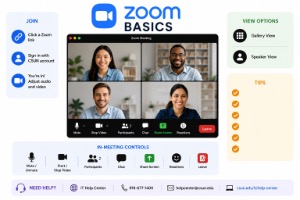
  • Zoom Basics

    Host: Megan Duncan This workshop introduces faculty to the essential features of Zoom for hosting synchronous online classes. Participants will learn how to schedule and start meetings, manage audio and video settings, share screens, use chat for communication, and navigate basic security options. Designed for beginners, this session provides practical tips to ensure smooth and… Continue reading Zoom Basics

    Teaching with Zoom

    Online via Zoom; Connection details provided upon registration

    Host: Megan Duncan Get engaged with Zoom! This workshop will show you how to communicate and collaborate effectively during synchronous online lectures using Zoom’s interactive tools. Learn how to run polls for surveys or voting, collaborate on a digital whiteboard, encourage participation through reactions, and explore additional features to boost engagement. Register for the workshop… Continue reading Teaching with Zoom

  • Zoom Beyond the Basics (Teaching with Zoom)

    Online via Zoom; Connection details provided upon registration

    Boost Engagement in Zoom: Master Polls, Whiteboards, Reactions, and More Description: Engage your course using Zoom! This workshop will show you how to communicate and collaborate effectively during synchronous online lectures using Zoom’s interactive tools. Learn how to run polls for surveys or voting, collaborate on a digital whiteboard, encourage participation through reactions, and explore… Continue reading Zoom Beyond the Basics (Teaching with Zoom)

    Do you use Zoom in your course? Check out Zoom’s new functions

    Online via Zoom; Connection details provided upon registration

    Zoom Basics: Master the Essentials for Seamless Online Teaching Description: This workshop introduces faculty to the essential features of Zoom for hosting synchronous online classes. Participants will learn how to schedule and start meetings, manage audio and video settings, share screens, use chat for communication, and navigate basic security options. Designed for beginners, this session… Continue reading Do you use Zoom in your course? Check out Zoom’s new functions